
Symplast Integrations
Introduction
This guide will explain which Symplast data fields are transferred to MyMedLeads and provide details on the specific fields that MyMedLeads accesses.
Intended Audience
This document provides instructions for Symplast staff members responsible for scheduling patients. It covers how to optimize the mapping of appointment types, procedures, and doctors/resources. The sections on utilizing Symplast’s resources may be most relevant for power users of the system.
Lead Data
This document outlines how information is transferred from Symplast and utilized within the MyMedLeads Platform. It will explain the communication flow between the two systems. There are minor differences in the data that can be written from MyMedLeads to Symplast versus what can be read from Symplast. As a result, this section is divided into two parts.
Converting To Symplast
Pressing the “Convert To Symplast” button in MyMedLeads will immediately (within 30 seconds) transfer data from MyMedLeads to Symplast. While the Lead Source itself does not transfer to Symplast, the Lead Source Type will transfer (as defined when the Lead Source was created). The remaining information should be self-explanatory. The specific MyMedLeads fields communicated to Symplast are also highlighted below.
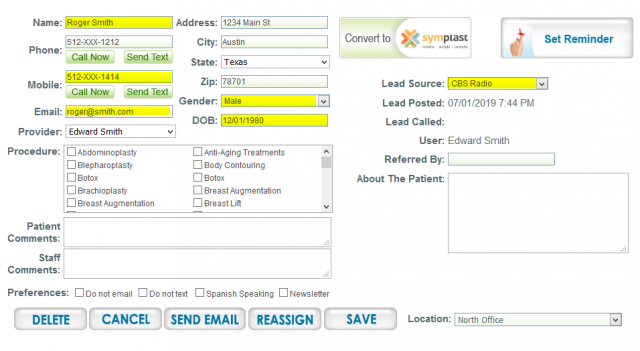
The MyMedLeads data is converted and populated into the highlighted fields within the Symplast system.
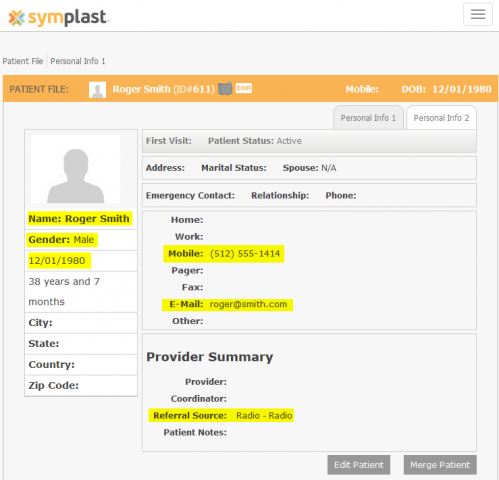
Referral Source and Sub Referral Sources
During the Symplast integration process in MyMedLeads, you can import your existing ReferralSources and SubReferralSources from Symplast. You must then select default ReferralSource and SubReferralSource settings within the MyMedLeads integration screen. These default settings will be used to designate the ReferralSource(s) for any leads converted from MyMedLeads into Symplast.
Symplast Data Coming Into MyMedLeads
Symplast provides access to patient, appointment, and transaction data. The provided screenshots show where this data is sourced from within the Symplast platform.
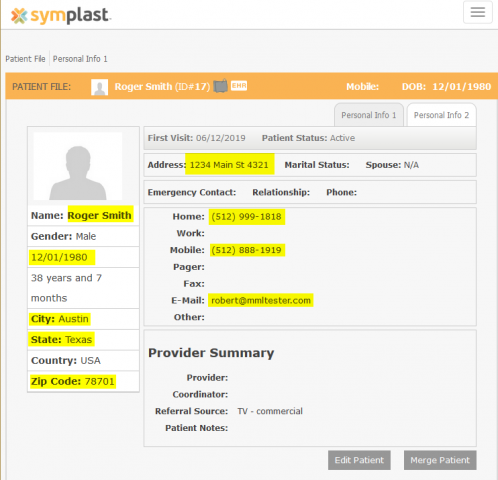
For Patient Data, the highlighted screen displays the specific data that is shared. This data is only shared when an Appointment is created or updated. Simply creating a Patient record in Symplast does not generate a Lead in MyMedLeads.
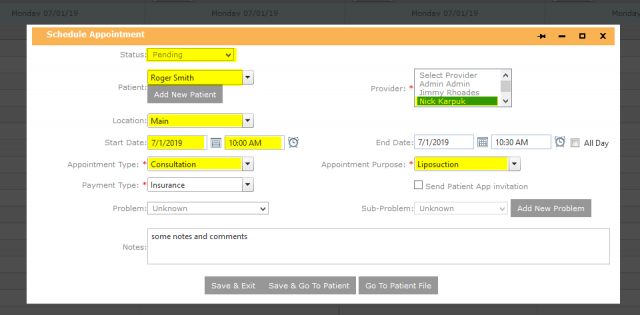
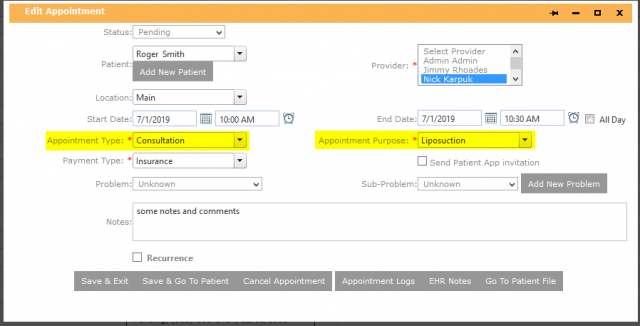
The screengrab below shows the appointment data that is communicated from Symplast to MyMedLeads when an appointment is created or updated. Your MyMedLeads account has a polling interval set to pull appointment data from Symplast once per hour. This polling interval is configurable in your EMR settings. The specific appointment fields that are communicated from Symplast to MyMedLeads are highlighted in the screengrab.
Appointment Data
MyMedLeads processes appointment data from Symplast, drawing information from various fields. The following section outlines where and how we handle this appointment data. When opening a new or existing appointment in Symplast’s Calendar, there are two specific fields that impact the lead’s status in MyMedLeads: Appointment Type and Appointment Purpose.
Appointment Types
To ensure accurate reporting, it’s important that your staff communicate your appointment types (consultation, procedure, minor procedure) to your account executive. This allows the MyMedLeads platform to properly identify the appointment type. You can configure these mappings within your account.
Appointment Purposes and Reasons
The MyMedLeads platform uses the “Appointment Purpose” field to identify the type of procedure, surgery, or consultation the patient has scheduled. It then leverages this data across several features, including marketing campaigns and requests for patient reviews, testimonials, and feedback.
To ensure the platform’s logic can properly track this information, it is required that your staff provide us with the corresponding “mappings” or procedure names. Once we have entered this data into the dashboard, the tracking functionality will be enabled.