
PatientNOW Cloud Integrations
Introduction
This guide will explain which PatientNOW fields are transferred to MyMedLeads, and provide details on the specific fields that MyMedLeads can access.
Intended Audience
This document provides instructions for staff members who schedule patients in PatientNOW. It covers how to optimize mappings of Appointment Types, Procedures, and Doctors/Resources. Additionally, the sections on utilizing PatientNOW’s resources may be more applicable to advanced users of the system.
Lead Data
This document outlines how the MyMedLeads Platform retrieves and utilizes information from PatientNOW. It will walk you through the communication between the two systems. There are minor differences in the data that can be written to PatientNOW versus what can be read from it. As a result, this section is divided into two parts.
Converting to PatientNOW Cloud
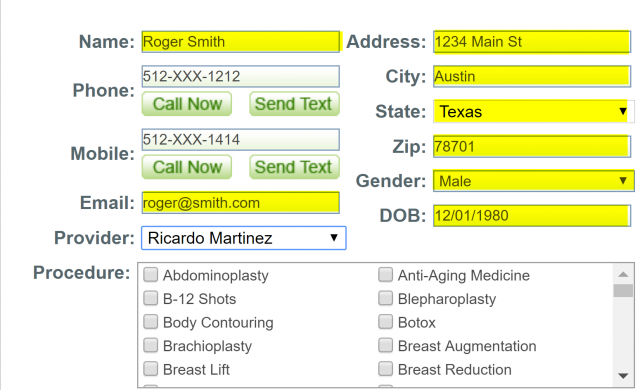
Pressing the “Convert To PNCloud” button in MyMedLeads will immediately transfer the data to PatientNOW within 30 seconds. The data being pushed from the MyMedLeads platform to PatientNOW is highlighted below.
PatientNOW Cloud Data Coming Into MyMedLeads
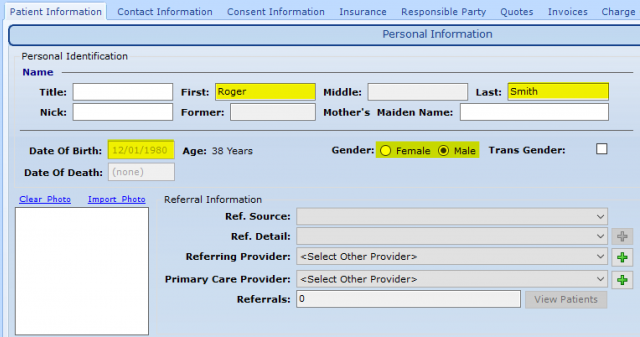
PNCloud provides the following data: patient, appointment, and transaction information. The attached screenshots show where this data is sourced from within PNCloud.
The patient data highlighted in the screenshots is only shared when an appointment is created or updated. Simply creating a patient record in PNCloud does not automatically generate a lead in MyMedLeads

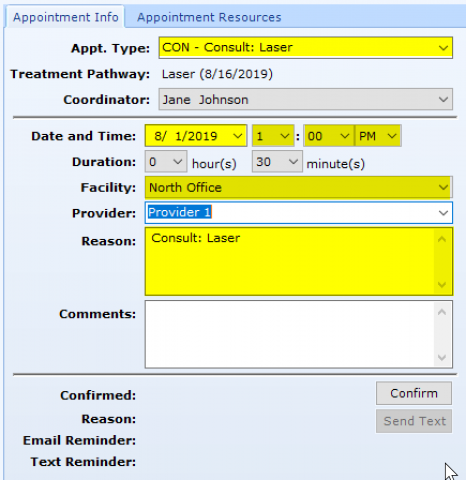
The screenshot below shows the appointment details that are transmitted to MyMedLeads when an appointment is created or updated in PNCloud. The highlighted fields indicate the specific data being communicated to MyMedLeads. Your MyMedLeads account should be updated with this appointment data within a few minutes.
Appointment Data
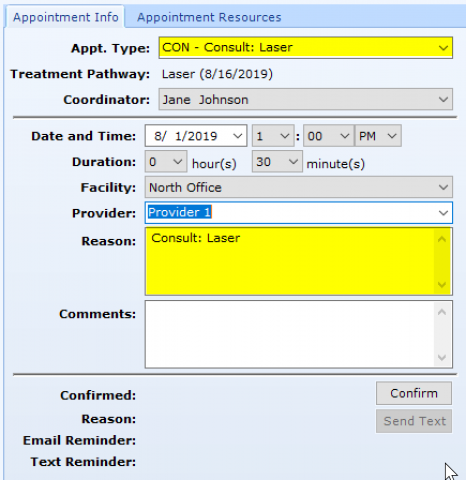
MyMedLeads extracts appointment data from various fields within PNCloud. The following section outlines how this appointment data is processed. When viewing new or existing appointments in the PNCloud calendar, two fields – “Appt. Type” and “Reason” – impact the lead’s status in MyMedLeads. To ensure accurate, it’s highly recommended that you and your team agree on a consistent process for updating the “Appointment Type” and “Reason” fields. This will help prevent the loss of important keywords that MyMedLeads uses for its logic. These two fields are highlighted below.
Appointment Types
When scheduling a Lead within PatientNOW, your staff typically use the “Appt. Type” dropdown. This information is then copied into the “Reason” field. MyMedLeads looks for keywords like “consult” or “surg” in the “Reason” field to determine the appointment type (e.g. Consultation, Surgery, Follow-up, etc.).
To ensure accurate reporting on the MyMedLeads platform, it’s important that your staff communicate your appointment types (Consultation, Procedure, Minor Procedure) to your Account Executive. This allows the platform to properly identify the appointment type. The Account Executive will configure these appointment type mappings within your account
Appointment Purposes and Reasons
The MyMedLeads Platform uses the “Reason” field to identify the type of procedure, surgery, or consultation scheduled for each patient. This data is then leveraged across several platform features, including marketing campaigns and patient feedback requests. To ensure accurate tracking, please provide your staff’s “mappings” or procedure names to our team, so we can enter them into the dashboard.