
MyMedLeads Overview
Welcome to MyMedLeads! This user guide provides all the essential information users need to fully leverage the power and efficiencies of this integrated system. It serves as a starting point for new users and a reference for existing users getting acclimated to the MyMedLeads and EMR/PM software integration.
MyMedLeads is a pre-patient management system that automatically captures, tracks, and manages new leads to increase the likelihood of converting inquiries into patients. The software includes features like automated follow-up lists, email marketing solutions, text message reminders, and marketing ROI reports.
The practice management software integration allows MyMedLeads to communicate directly with your EMR/PM system. When a lead schedules an appointment, the new patient can be transferred directly without manual data entry. This two-way integration ensures MyMedLeads stays continuously synced with your scheduling system..
How do I set up MyMedLeads for Integration?
To use the new MyMedLeads integration, you must first establish integration between MyMedLeads and your practice management software. Your MyMedLeads Implementation Specialist will guide you through this setup process.
How do I convert a lead in MyMedLeads to a patient?
After a lead or call is posted to MyMedLeads, navigate to the lead detail page and select the “Convert to” button. This will instantly populate the patient’s demographic information in your EMR/PM software, allowing you to schedule the appointment.

How do I send a patient from the EMR/PM software into MyMedLeads?
MyMedLeads provides flexible account settings that determine how your EMR/PM software integrates with the MyMedLeads platform. For example, your account can be configured to automatically create new leads in MyMedLeads whenever an appointment-related action is detected in your EMR/PM software. Alternatively, your account can be set up to generate a new lead anytime a patient’s information or existing appointments are modified (MyMedLeads will automatically manage and merge any duplicate leads).
The benefits of only creating leads when an appointment-related action is detected are that the lead will be placed in the correct stage of the MyMedLeads sales funnel. The lead’s status will start as “Scheduled” rather than “New,” which is important if the patient already has pre-existing appointments. This helps avoid negative impacts on your email marketing campaigns, such as the patient receiving “Welcome to Plastic Surgery Center” emails when they are already scheduled.
Additionally, there is no manual process required to push leads from the EMR/PM software, as this is fully automated. We do offer configurations to ignore or avoid creating leads for certain types of actions detected within the EMR/PM software.
When I schedule a patient in the EMR/PM Software, what happens to the patient in MyMedLeads?
When a patient is scheduled in your EMR/PM software, their appointment details will automatically sync to MyMedLeads, and the lead will progress to the “Scheduled Patient” stage of your sales funnel.
After a lead is converted and added to your EMR/PM software, the two systems will stay in sync. Any changes made to the lead in your EMR/PM software will be reflected in the MyMedLeads version as well. However, if a lead is converted but not yet scheduled, it will move from “New Leads” to “Follow Up” in MyMedLeads.
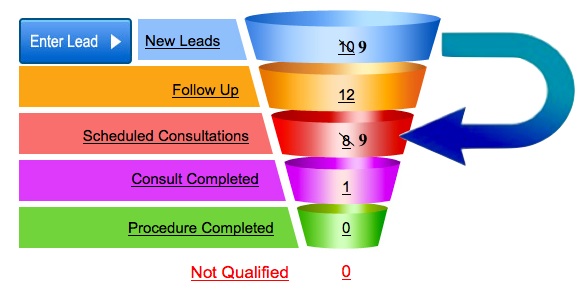
When a lead is converted and scheduled in your EMR/PM software, the New Leads count will decrease by one and the Scheduled Consultations count will increase by one, as illustrated below.
When I check a patient in, how is this reflected in MyMedLeads?
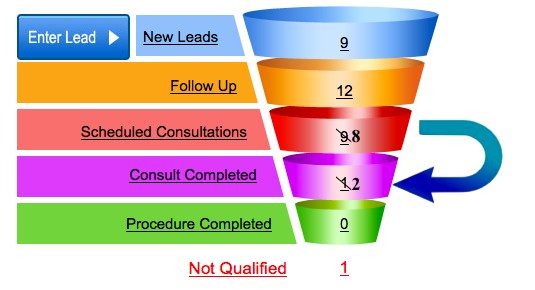
When a patient arrives for their consultation and is checked in, their lead is moved down to “Consult Completed” in the MyMedLeads Funnel. After the patient is checked in, the “Scheduled Consultations” count decreases by one, while the “Consult Completed” count increases by one.
Can I delete a lead in MyMedLeads that has already been sent to the EMR/PM Software?
Deleting a lead in MyMedLeads and then modifying or scheduling that lead within the EMR/PM software will result in the lead being recreated.
What happens to a patient in MyMedLeads if I update the patient’s data in the EMR/PM Software?
Any changes made to patient information in the EMR/PM Software will automatically update the corresponding MyMedLeads patient record. However, updates made directly in MyMedLeads will not sync back to the EMR/PM Software, creating a one-way data flow that resembles a master-slave relationship.
If I change the patient’s data in MyMedLeads, does this update the patient in the EMR/PM Software?
After a lead is converted and transferred to your electronic medical record (EMR) or practice management (PM) software, any subsequent changes made within MyMedLeads will not be synced or communicated to your EMR/PM system.
How is revenue tracked in MyMedLeads?
MyMedLeads tracks the source of each lead, including form integrations, social media, organic and paid keyword tracking, referral websites, and more. To accurately measure ROI, it is crucial that revenue is attributed to leads that have progressed to the “Procedure Completed” stage.
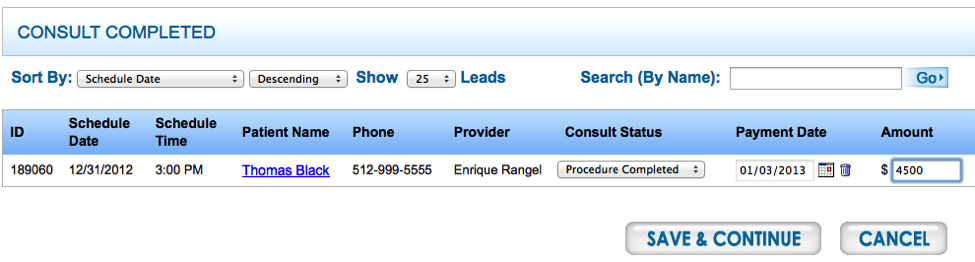
To promote leads into procedure completed:
- Click on Consult Completed
- Change the Consult Status to Procedure Completed
- Enter a date of the payment
- Enter an amount collected from the client
- Press “Save”
Once a lead is converted, the lead(s) will show up in the funnel as a procedure completed.
How Does the System Manage Duplicate leads/patients in the system?
Leads may come into MyMedLeads through phone calls or form submissions, but you or your staff may also enter leads directly into your EMR/PM software and schedule them. This can result in duplicate leads existing in MyMedLeads that were never converted. To address this issue, MyMedLeads employs one of two approaches:
Automatic Merging – When a lead in MyMedLeads matches a lead in your EMR/PM software based on name, phone, and email, the system will automatically merge the leads. Any new information sent from your EMR/PM software will overwrite the data in MyMedLeads, except for the lead source. It’s important to note that the merging process is not retroactive and only applies to future leads going forward.
Manual Merging – If a lead in MyMedLeads appears to be a duplicate but is not an exact match, the system will prompt you to review the lead details in your EMR/PM software and in MyMedLeads. You can then choose to either merge the leads or mark the lead as ‘Not a Duplicate’. However, note that the merge function is not retroactive and will only apply to future leads.