
The Sales Funnel
The Sales Funnel
The redesigned sales funnel provides enhanced data visualization, allowing you to easily track lead progress through clearly defined stages. This gives you a highly accurate snapshot of your lead management process.
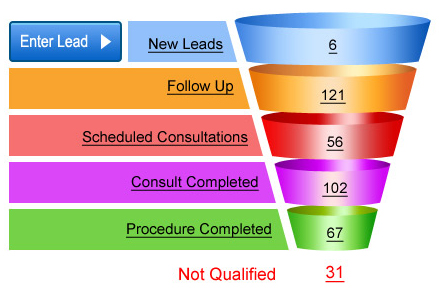
The system organizes leads into different stages of the sales funnel:
New Leads – The new leads section displays uncontacted leads that require follow-up. To ensure effective lead management, contact new leads promptly to keep the number of uncontacted leads low. Ideally, maintain zero or near-zero uncontacted leads. If the number grows consistently, leads are not being managed efficiently. New uncontacted leads originate from three sources:
- Phone calls through call tracking numbers without follow-up.
- Uncontacted form submission inquiries via call or email (excluding automated marketing emails)
- Manually entered leads awaiting assignment
Follow Up – Once initial contact is made, these leads are sorted into groups for continued follow-up until an appointment is scheduled. These leads have been contacted but have not yet scheduled a consultation. Grouping them makes it easier to manage the continued follow-up process.
Scheduled Consultations – Leads that have been scheduled for past, current, or future consultations appear in the Scheduled Consultations section. Once the scheduled consultation date has passed, you can update the lead’s status to either Consult Completed or Schedule Completed.
Consult Completed – After a consultation ends, staff move leads to the Consult Completed category, unless payment was collected during the initial consultation. In that case, leads skip Consult Completed and move directly to Procedure Completed – for example, Botox patients who pay at their first appointment. Otherwise, leads remain in Consult Completed until they schedule a procedure. Follow up with leads in this category.
Procedure Completed – The goal of our funnel is to track revenue per lead so we can attribute it to the original marketing source. Once a lead reaches the Procedure Completed stage, revenue can be assigned to that lead for tracking.
Not Qualified – Leads deemed not fit for surgery go here. You can still view them, but they won’t contact you and they won’t receive any automated marketing material from your practice either.
Moving your lead through the funnel manually
- To schedule appointments: Click “Schedule Appointment” and enter details. The lead moves to Scheduled layer. Appointment details show in history.
- For completed appointments
- Click on Scheduled Consultations and Sort by Last Name to view all of your patients alphabetically. (These next steps will require that you open your practice management software as well.)
- Select patients that have already had a procedure and select Procedure Completed from the drop-down list. Upon doing so, you will also have the option to add revenue for that patient. Once you are done, hit save.
- Repeat the process to move Scheduled Consultations that have shown up and their appointment was completed and hit save.
Once you have done this, all of your leads will be in the right place. With revenue & expenses updated, ROI or Return on Investment Reports are now available so that you can track which lead sources are working.