
Practice+ Integration
Introduction
The integration between MyMedLeads and Practice+ includes the ability to automate migration of data from Practice+ account to your MyMedLeads account. This data includes scheduled appointment data that can be reported on and build workflows within your MyMedLeads account.
Intended Audience
This document is written for staff members who work directly in both MyMedLeads and Practice+. The document outlines the communications between MyMedLeads and your Practice+ account.
Lead Data Communicated
The below outlines what data is communicated from MyMedLeads to Practice+
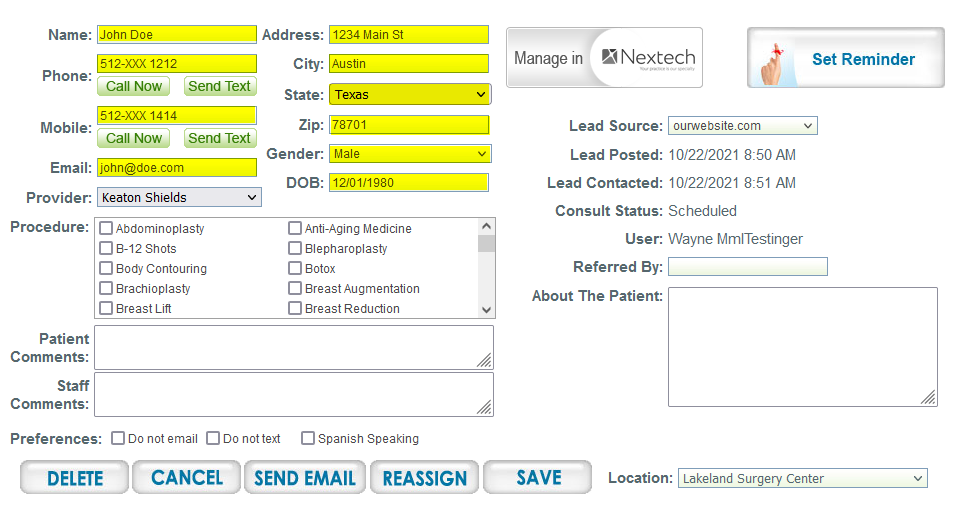
The below outlines what data is communicated from Practice+ to MyMedLeads
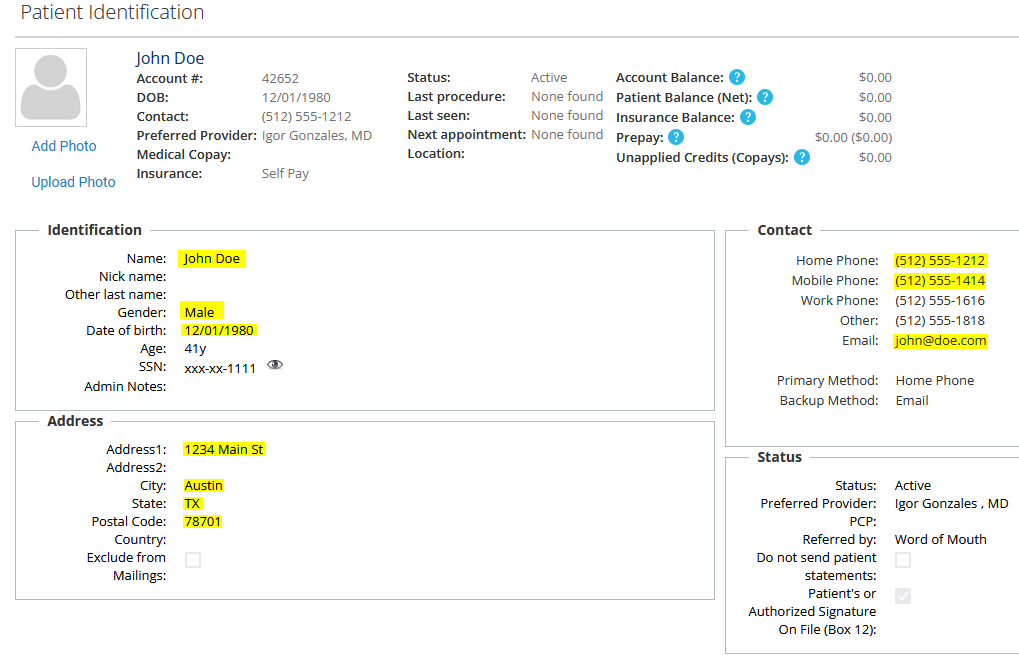
Required Fields to Convert to Practice+
Within your Practice+ account, there are preferences that include Required Fields. Your team will need to manage and ensure that all fields that are required are properly filled out. Below are the defaulted Required Fields within most Practice+ accounts.
First and Last Name are both required to push to Practice+.
E-mail address, and one phone contact is required. Email is defaulted to: ‘no@email” if not supplied.
Postal code is required.
Date of Birth is required, this field is defaulted to “01/01/1900” in Practice+, if not provided.
Provider is required.
Duplication Logic
Both Practice+ and MyMedLeads has duplication logic. Practice+ utilizes a combination of the following Lead Attributes to determine if a duplicate exists. If a duplicate does exist, then Practice+ will not create the Lead.
Practice+ Duplicate Fields
First and Last Name
Email Address
Birthdate
and one of the Home and Mobile Numbers
MyMedLeads Duplicate Fields
First and Last Name
Email Address
Home and/or Mobile Numbers
IF DUPLICATION LOGIC is triggered when attempting to convert a lead from MyMedLeads to Practice+, due to the Lead already exists within Practice+. Then you will see an automated Note within the Lead’s activity history (within MyMedLeads), that the Lead already exists within Practice+. Message: “Exists in Practice+”.
Triggers and Expectations
When you press the Convert To Practice+ button on the Lead Details screen, the lead information is communicated a single time to Practice+. Once converted, you should be able to search Practice+ and locate the Lead within 30 seconds.

Once the Lead has been converted to Practice+ there will be an ActivityHistory item that identifies when this Lead was successfully pushed. You will need to refresh the screen to see the new ActivityHistory item and the time should never be over 30 seconds. IF an ActivityItem is not created, then it is possible that the Lead was not successfully created, possibly due to being a Duplicate within Practice+. If an Activity Item is created after you press the Convert button, then our system received an ID, meaning a Lead was successfully processed within Practice+.
Practice+ to MyMedLeads
Data is communicated when an Appointment is created, cancelled and/or updated. Below outlines the data from Practice+ communicates. It is always best to cancel an appointment rather than deleting the appointment. The deletion of appointments may not be communicated to MyMedLeads.