
You and your staff cannot communicate images to leads, via our Text/SMS features. The leads can respond with images, those images will be emailed to your email address that is on file with MyMedLeads. Please make sure that you have preferences turned on to receive notifications of incoming texts. This is specific to our Two Way Texting feature, as the appointment confirmations normally would not receive an image.
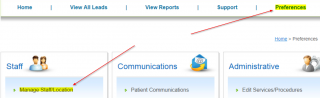
To turn this on, you will need to navigate to: Preferences -> Manage Staff/Location screen. On this page you will need to click on “Edit” next to your User Name.
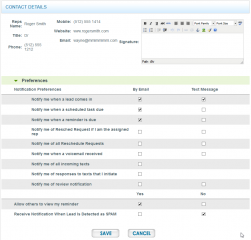
On this screen there is an “Set Preferences” button on bottom right of the screen, click that. On this page you can set the preference for receiving email notifications of all incoming text. The checkbox to select is labeled: “Notify me of all incoming texts”.
You can learn more about our Two Way Texting Feature Here.