
While configurations are normally the cause of the issue and would require a support ticket to be opened, one common scenario is that there is no Default Location selected within Nextech.
Check Default Location
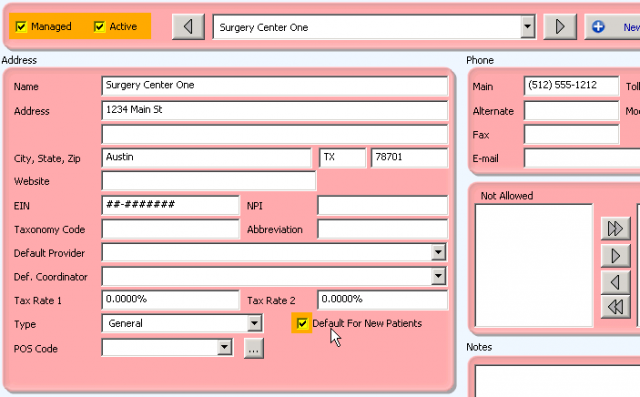
A default location within Nextech is required for new leads to be generated from an HL7 interface (such as MyMedLeads). To do this (or to check this) is very easy. Within Nextech go to Gold Key marked Admin—the first tab Locations. On the Locations Tab, there is a dropdown to select the Location and within the address box you see a checkbox labeled ‘Default for New Patients’. One of your locations must have this checkbox selected, otherwise the Leads will be batched to the HL7 Tab (under Links). From there you would have to import the Lead manually.
After selecting one of the checkboxes
If this does not appear to be the issue, then it is possible that we may need to restart your Plugin or troubleshoot this further.