
You can find this report by using the primary navigation of the MyMedLeads account, it is located under Reports -> Keyword and Referral Report. Using the Date Filter at the top right corner of the page, you can control the scope of your search.
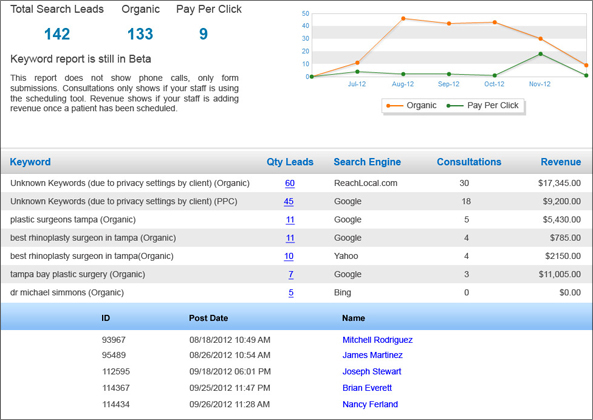
Our keyword reporting feature allows you to dig even deeper into lead data by associating keywords from organic and PPC searches to your incoming web inquiries. This report also tracks the referral sites that initially sent leads to your website (i.e. Google, Bing, RealSelf, etc…) This intelligent data shows you which keywords are sending the highest converting patients and generating the most revenue for your practice. This valuable information can then be used to revamp and adjust your online marketing campaigns and SEO strategy accordingly.
Additionally, knowing what search term a prospective patient used to find your practice can provide your staff with valuable context about their needs. Having a better understanding of a lead’s interests before contacting them can often improve call outcomes.