
Edit My Preferences
Introduction
Intended Audience
This document is written for any user within the MyMedLeads Platform. The document’s instructions only require access to MyMedLeads.
User Preferences
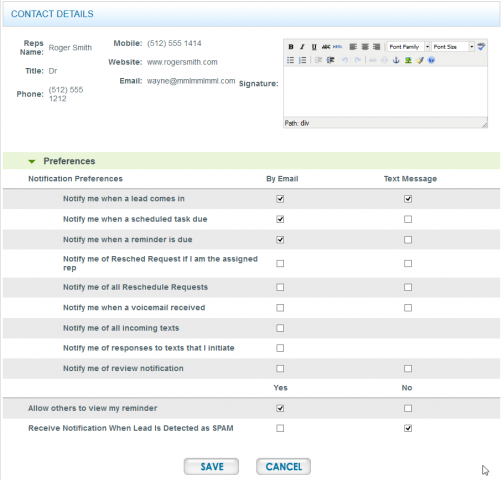
You are able to locate the User Preferences by navigating to: Preferences -> Manage Staff/Location. On this screen you will see a list of all Users and Providers within the account. You are able to click Edit next to your User Account and update your information. Please note that your email address must be unique within our system, it is not advised that you update your email address too often as you do use this to login. Once on the Edit Screen of the User, you can click the Set Preferences button at the lower right hand corner of the form. This opens the User Preferences screen (see screen grab below).
Preference Expectations
This section of the document will go over how each of the preferences are used and what you should expect.
Signature
You are able to create an email signature using the WYSIWYG editor at the top right of the screen. This signature will appear within all of your manually created/sent emails.
Notify me when a lead comes in
As the preference states, you are able to control if and how MyMedLeads informs you of newly incoming Leads. This preference will also send you a notification if an existing Lead comes in and was merged into the existing Lead. This notification only informs you of Web Form Submissions, from your site or your third-party sites (such as directory sites, example: realself.com). This notification does not inform on manually created leads, incoming calls, leads/appointments that were detected from your EMR.
Notify me when a scheduled task due
You will receive an email notification indicating that a monthly/weekly task was scheduled for this time. This preference is used for Independent Accounts, that are NOT integrated with any scheduling software. This preference will notify you tasks, such as “Marked patients that showed vs. no showed”, your Account Executive would have went over this option with you during training.
Notify me when a reminder is due
You will receive an email notification indicating that a Reminder was scheduled for this time.
Notify me of Resched Request if I am the assigned Rep
When Appointment Confirmations go out and the lead requests a reschedule, rather than Confirming the Appointment, you can be notified that the Lead would like to reschedule. This preference is specific if your User Account is the assigned Rep to the Lead.
Notify me of all Reschedule Requests
When Appointment Confirmations go out and the lead requests a reschedule, rather than Confirming the Appointment, you can be notified that the Lead would like to reschedule. This preference will notify you of ALL requests for a reschedule, even if the Lead is not currently assigned to you.
Notify me when a voicemail received
When leads are calling one of your Call Tracking numbers and no one answers in a reasonable time (30 seconds), then our system can/will collect a voicemail from the caller. You can be notified of these voicemails, via email using this preference.
Notify me of all incoming texts
This preference is specific to sending manual Text/SMS messages to individual leads. The system will email you a notification indicating that a Lead has replied back within one of your ongoing Text Conversations. This is great to have on for when leads send in pics, as that is the only way to receive media/pictures from Text/SMS.
Notify me of responses to texts that I initiate
This preference is specific to sending manual Text/SMS messages to individual leads. If you are the User who initiated the Text Conversation with the Lead, you can be informed of when the Lead texts back using this preference.
Notify me of a review notification
If your practice is utilizing our Review/Feedback feature(s), then this preference can be used to be notified of newly received Reviews/Feedback from leads.
Allow others to view my reminders
This preference allows you to share your Reminders with the team, so that the Reminder shows up on all Staff Member’s Funnel Page, under the To Do section.
Receive Notification When Lead is Detected as SPAM
This preference is not widely used, it will send you an email if a form submission was detected that had SPAM-y words, links, names, phone numbers and/or email addresses.